

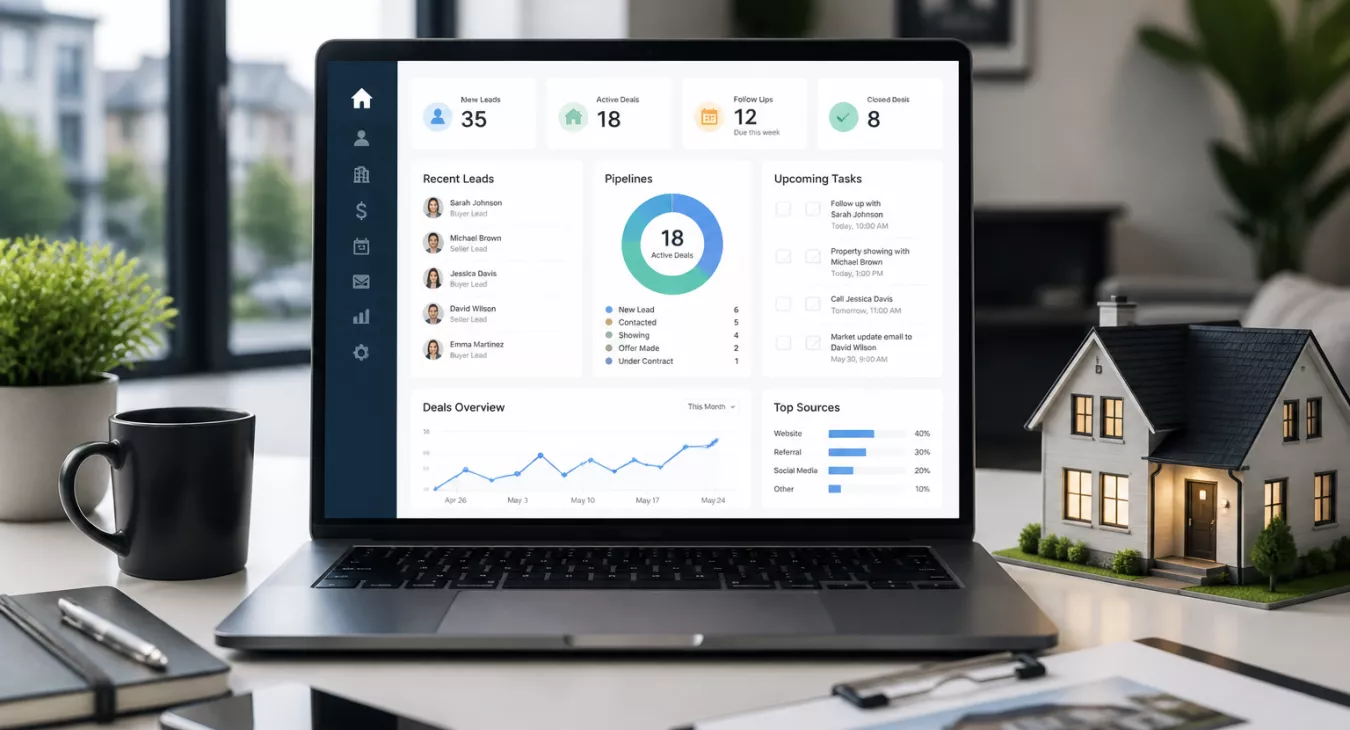
Discover what a CRM real estate is and 7 essential features to streamline your business, manage leads, and close more deals faster.
Products and Tools Mentioned in this Post

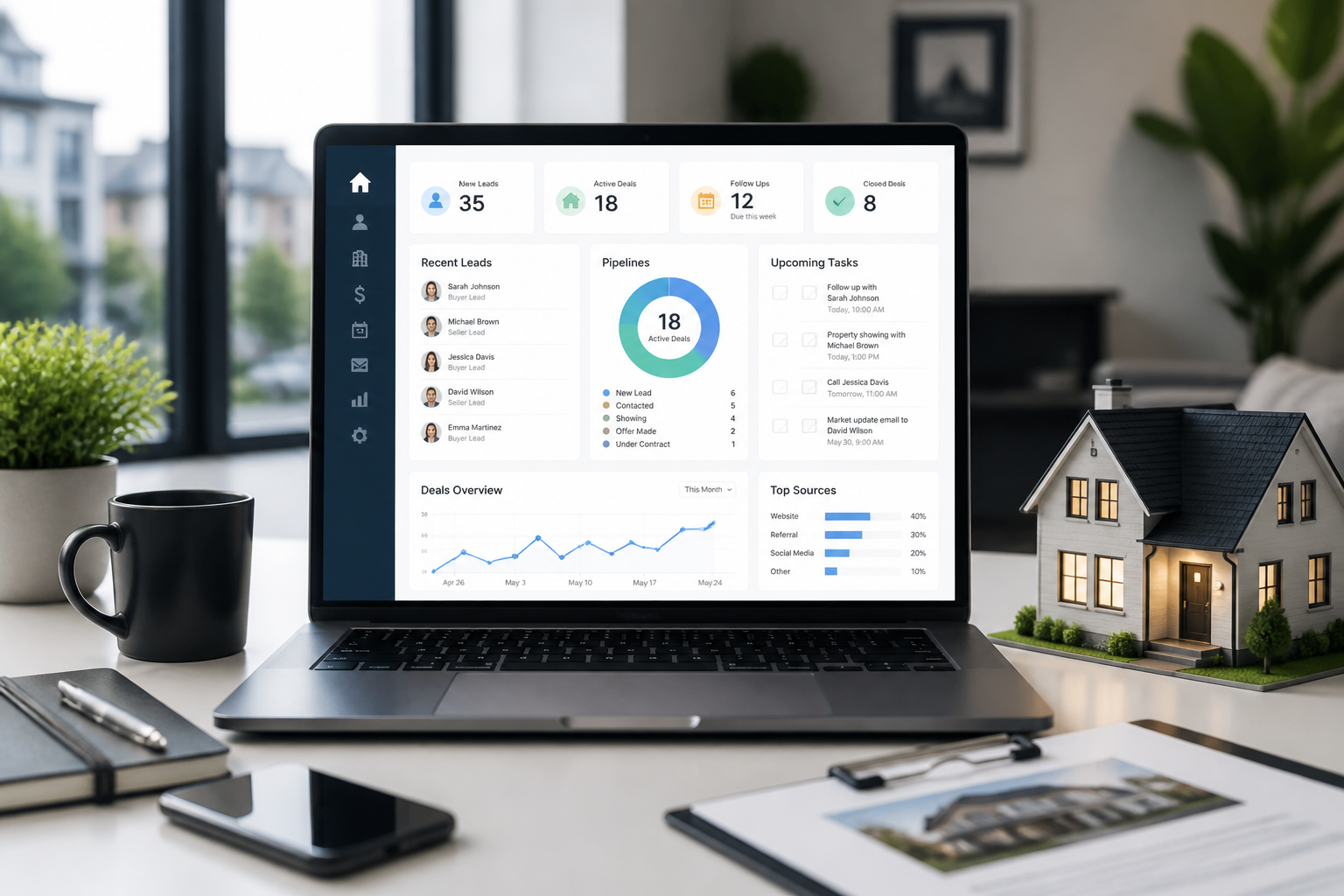
Table of Contents
- what's a Real Estate CRM?
- How a Real Estate CRM Works
- 7 Must-Have Features of Real Estate CRM Systems
- Benefits of Using a Real Estate CRM
- Who Should Use a Real Estate CRM?
- How to Choose the Right Real Estate CRM
- Best Practices for Implementing a Real Estate CRM
- Real Estate CRM Use Cases in Practice
- Conclusion
- Frequently Asked Questions
Over 1.4 million Realtors are out there competing for the same deals. Staying organized? That's not a nice-to-have anymore — it's how you survive. You're juggling dozens of hot leads, closing multiple transactions at once, and nurturing relationships that'll span your entire career. Spreadsheets and sticky notes won't cut it. A real estate CRM is the answer. And if you're running a team or scaling your operation, knowing how to leverage a CRM effectively can literally change your bottom line. This guide covers what a CRM actually is, which features matter most, and how to pick and roll out the right one for your business.

what's a Real Estate CRM?
Definition and Core Concept
CRM stands for Customer Relationship Management. It's software that keeps all your client data, conversations, and deal progress in one place instead of scattered across spreadsheets, emails, and sticky notes. A real estate CRM takes that basic idea and builds it specifically for how you actually work — with MLS integrations, transaction tracking, and workflows that match the rhythm of a 30-to-90-day close.
Think about your current process. You're probably tracking leads in one tool, contracts in another, and follow-ups in your email. A real estate CRM consolidates all of that. Every contact, conversation, property inquiry, and transaction milestone lives in one hub — from initial outreach to closing and the repeat business that follows.
How It Differs From Generic CRM Software
Salesforce and HubSpot are powerful tools. But they're built for software companies, marketing agencies, and service businesses — not real estate investors juggling multiple concurrent deals with different ARVs, rehab timelines, and exit strategies.
Generic platforms force you to customize heavily. A purpose-built real estate CRM? It ships with what you actually need: MLS sync, transaction coordination, listing management, and automated follow-up sequences built around buyer and seller psychology.
The numbers prove the shift is real. The real estate CRM software market hit approximately $5.31 billion in 2026, expanding at a 12.2% CAGR through 2035. Professionals aren't experimenting anymore — they're investing in platforms built for their actual business.
Real Estate-Specific Features
What separates purpose-built from generic isn't marketing speak. It's what's actually in the software.
Direct MLS integration. Property portal connectivity to Zillow and Realtor.com. Listing and property records tied to contact profiles. And here's the critical part: pipeline views built around transaction stages, not generic sales funnels. A real estate deal doesn't move through "prospecting → qualification → proposal" — it moves through "leads → under contract → due diligence → closing." The software needs to speak that language.
Automated workflows designed for the 8-12 week close window. Task sequences that trigger based on where a deal actually sits. That's what separates a CRM that works in real estate from one you're forcing to fit.
As of 2026, approximately 78% of real estate firms have adopted CRM platforms. It's no longer a competitive advantage. It's table stakes.
Back to topHow a Real Estate CRM Works

Core Functionality and Data Organization
Buyers. Sellers. Investors. Referral partners. Past clients. A real estate CRM captures, stores, and organizes information about every person in your professional sphere. Each contact gets a dedicated record that pulls together everything — emails sent and received, calls logged, meeting notes, shared documents, properties viewed or inquired about. All of it in one place.
And that's the magic: a "single source of truth." You're not digging through your inbox trying to remember when you last touched a lead. You're not flipping through some notebook hunting down a client's property preferences. Everything's there instantly, searchable, sortable.
Workflow Automation
But here's what really separates a CRM from a fancy contact list — automation. A properly configured real estate CRM automatically sends follow-up emails when fresh leads land in your system. It reminds you to call past clients on the anniversary of their home purchase. It assigns tasks to your team when a transaction moves to the next stage. It even alerts you when a contact hasn't been touched in a set number of days.
Why does this matter so much? Real estate deals develop slowly. Sometimes they drag for months. The agent who stays top-of-mind consistently wins the listing — that's just how this business works. And consider this: U.S. homes are sitting on the market for a median of 50 days as of August 2026. That's your window. Consistent, timely communication during those 50 days? That's the difference between winning and losing the client entirely.
Pipeline and Deal Tracking
You also get visual pipeline management — usually a Kanban-style board or funnel view showing exactly where every lead and transaction stands. New inquiry. Showing scheduled. Offer submitted. Under contract. Closed. Your entire business at a glance. Bottlenecks become obvious before they cost you deals. And if you're running a team or managing multiple agents? This visibility is invaluable. You can monitor what everyone's doing in real time.
Back to top7 Must-Have Features of Real Estate CRM Systems
Not all CRMs are created equal. When you're evaluating platforms, these seven features actually move the needle for real estate professionals.
1. Contact and Client Management
Any CRM lives or dies by its contact database. But in real estate, you need way more than a name and phone number. A solid contact management system stores property preferences, budget ranges, timeline notes, communication history, family details, and transaction history — all tied to one record. The best systems let you segment contacts by type (buyer, seller, investor, renter) and status (active lead, past client, referral source). This means targeted outreach instead of spray-and-pray mass blasts.
2. Lead Capture and Management
Leads come from everywhere. Your website, Zillow, Realtor.com, Facebook ads, open houses, direct referrals — the list goes on. A real estate CRM should integrate with these sources to automatically capture leads and route them into your pipeline without you manually typing anything in. Speed-to-lead matters. The faster a new inquiry gets a response, the higher your conversion rate climbs. Automated lead routing and instant follow-up sequences handle this directly. For more on building a lead-generating digital presence, see our guide on what pages your real estate investor website needs.
3. Transaction Coordination
Real estate transactions are messy. You've got buyers, sellers, agents on both sides, lenders, title companies, inspectors, and attorneys all moving pieces at once. A CRM with built-in transaction coordination tools lets you manage documents, track deadlines, assign tasks to stakeholders, and monitor contract contingencies — all in one place. And this becomes especially critical when you're navigating concepts like the difference between contingent and pending status. Nothing falls through the cracks during those critical contract periods.
4. Marketing Automation
Consistent communication builds trust. That's what turns prospects into clients and clients into advocates. Real estate CRMs with built-in marketing automation let you create drip email sequences for new leads, set up automated market reports for past clients, and trigger personalized follow-ups based on specific actions — a contact clicking a property link or attending an open house. Pair this with channels like direct mail campaigns. You get a multi-touch approach that keeps you visible over the long haul.
5. Reporting and Analytics
A CRM without reporting is just an expensive contact list. That's the truth. Strong analytics capabilities let you measure what's actually working — which lead sources produce the highest conversion rates, how long deals take at each pipeline stage, your revenue per transaction, and how each team member is performing. These insights enable data-driven decisions instead of gut-feel adjustments. Pair CRM analytics with broader real estate market indicators. You get a complete picture of your business performance and market conditions.
6. Mobile Accessibility
Real estate is a field business. You're showing homes, attending inspections, meeting clients at coffee shops — not sitting at a desk. A CRM without a capable mobile app isn't a CRM you'll actually use when it matters most. What should you look for? A mobile app that lets you log calls, access contact records, update deal stages, send follow-up messages, and check your task list from your phone with the same ease as desktop.
7. MLS and Third-Party Integration
Your CRM needs to play well with the tools already in your workflow. MLS integration pushes property data directly into contact records. Integration with email platforms (Gmail, Outlook), calendar tools, e-signature software (DocuSign), and lead portals (Zillow, Realtor.com) kills duplicate data entry and keeps your CRM grounded in reality. The CRM segment represents 27.4% of the total real estate software market as of 2025. That's why nearly every major real estate tool now prioritizes CRM integration.
Back to topBenefits of Using a Real Estate CRM

Improved Efficiency and Productivity
You'll notice the time savings almost immediately after setting up a CRM. Routine tasks like follow-up emails, appointment reminders, and task assignments get automated. That's hours every week you're not wasting on busywork — hours you can actually spend closing deals or analyzing new markets. For solo agents already juggling everything? It's transformative. Pair this with delegating administrative work to virtual assistants, and you've got a lean operation that actually scales.
Enhanced Client Relationships and Retention
Personalized service is what clients remember. A CRM lets you pull up the details that matter: their favorite neighborhoods, their kids' names, what they worried about during a showing last year, even the closing anniversary. You're not relying on your brain to retain all that. The result? It stops feeling transactional. One closing becomes ten referrals because you actually treated them like a human, not a deal.
Better Lead Conversion
Most agents bomb here. Consistent follow-up is the driver of conversion — full stop. But it's also where discipline breaks down. A CRM enforces it through automated sequences and task reminders so leads don't go cold by accident. Add smart segmentation to the mix, and you're prioritizing your hottest prospects while still nurturing the pipeline of future clients who aren't quite ready yet.
Scalability for Growing Teams
And here's what most people underestimate: what a CRM enables when you actually start scaling. Your first buyer's agent. Your transaction coordinator. Your admin hire. A solid CRM is the backbone that keeps everyone aligned and working from the same playbook. Shared pipeline visibility, access controls, team dashboards — growth stays manageable instead of turning into chaos.
Back to topWho Should Use a Real Estate CRM?

Individual Agents
Solo agents get real wins from a CRM. You're juggling everything — marketing, lead follow-up, showings, negotiations, transaction coordination. A CRM becomes your virtual operations manager, handling the organizational grunt work and automation so nothing falls through the cracks.


Real Estate Teams and Brokerages
Teams and brokerages need a CRM as their central command center. Brokers monitor agent performance, track deal flow, ensure compliance, and spot coaching opportunities from one dashboard. Here's the math: median gross Realtor income from 2025 activity hit $59,200. One extra closed transaction per agent per year covers a lot of CRM costs.
And the business expense picture matters too. NAR's 2026 Member Profile shows median annual business expenses at $9,530 — making CRM pricing a meaningful line item. But when you're looking at productivity gains? It's a no-brainer investment for any serious brokerage.
Real Estate Investors
Investors use CRMs in a completely different way than agents do. You're tracking motivated seller leads, managing acquisition pipelines, coordinating with wholesalers, hunting off-market deals. And if you're running complex structures? Syndication arrangements and concepts like a defeasance clause demand serious organization. A CRM keeps all deal docs and stakeholder communications in one place instead of scattered across emails and spreadsheets.
Property Managers and Developers
Property managers track tenant relationships, lease renewal timelines, and maintenance histories through a CRM. Developers use them for investor relations, pre-sales pipeline management, and coordinating across long development cycles. Different use cases, same payoff — everything stays organized.
Back to topHow to Choose the Right Real Estate CRM

Assess Your Business Needs First
Get clear on what you actually need before you start kicking tires on platforms. Are you flying solo as a residential agent, or running a team across multiple markets? Do you need that deep MLS integration, or is your real priority investor-focused deal tracking and pipeline management? And here's the one people skip: what's your technical comfort level, and how much time can you realistically sink into setup and training? Your answers should drive this evaluation—not vendor marketing.
CRM Evaluation Criteria
Compare platforms across these dimensions:
| Evaluation Criterion | Individual Agent Priority | Team/Brokerage Priority | Investor Priority |
|---|---|---|---|
| Contact & lead management | High | High | High |
| Marketing automation | High | High | Medium |
| Transaction coordination | Medium | High | Medium |
| MLS integration | High | High | Low |
| Team collaboration tools | Low | High | Medium |
| Reporting & analytics | Medium | High | High |
| Mobile app quality | High | High | Medium |
| Deal/pipeline tracking | Medium | High | High |
| Ease of setup | High | Medium | High |
| Third-party integrations | Medium | High | Medium |
Integration Capabilities
A CRM that doesn't play nice with your existing stack will create more headaches than it solves. Before you commit, verify native integration with your MLS board, email client, e-signature tool, lead portals, and accounting software. Sure, many platforms offer Zapier compatibility or integration marketplaces that can fill gaps. But native integrations? They're always more reliable than workarounds.
Data Security and Privacy Compliance
Real estate deals involve sensitive personal and financial data. Your CRM has to comply with applicable data privacy regulations—CCPA in California, GDPR if you've got international clients. Ask vendors point-blank about data encryption standards, breach notification policies, and where they're storing and backing up your data. It's not just a legal checkbox. It's a trust issue with your clients.
Pricing and ROI Considerations
CRM costs run all over the map depending on features and user count. Don't just think of it as a monthly expense. Think of it as an investment. One additional closed transaction per year—or even preventing one deal from ghosting due to missed follow-up—will pay for itself and then some relative to the national average commission rate of 5.70% as of February 2026 on a median home price. And if you're investing in professional development alongside CRM adoption, check out our breakdown of real estate mentorship programs worth paying for in 2026.
Back to topBest Practices for Implementing a Real Estate CRM
Set Up Before You Import
Here's what kills CRM adoption before it starts: importing all your contacts on day one, then trying to build the house around the foundation. Don't do that. Spend your first week configuring pipeline stages, workflow automation, email templates, and lead source categories. Get the architecture right before anything else. Your future self will thank you when you're not digging through duplicate contacts and misaligned workflows six months in.
Data Migration and Organization
Clean data is non-negotiable. Before you move a single contact into your CRM, deduplicate your list, standardize naming conventions, and assign contact categories. Think about how you'll actually use this system — are you distinguishing between active buyers, past clients, investor contacts, and referral partners? That distinction matters. Spend a week on this now and you'll save yourself 100 hours of cleanup later.
Team Training and Adoption
Your CRM fails because your team won't use it consistently. Not because the software is bad.
If your agents don't see how the CRM makes their day easier — faster follow-ups, better lead scoring, less manual data entry — they'll work around it. That inconsistent data is worse than no data. Get role-specific training in front of them. Show the listing agent how it streamlines showings and follow-ups. Show the investor contact manager how it tracks deal flow. And pick someone on your team to own adoption. Give them the title, the authority, and the expectation that they'll troubleshoot issues and celebrate the wins.
Avoiding Common Pitfalls
- Over-automating too early: Start with a few high-impact automations and add complexity gradually as your team becomes comfortable.
- Neglecting data hygiene: Schedule monthly or quarterly audits to remove stale contacts, update deal stages, and ensure records are accurate.
- Ignoring mobile setup: Configure the mobile app properly from day one — field agents who can't easily use the CRM on their phone will default to manual methods.
- Skipping the reporting setup: Define your key performance indicators before go-live so your dashboards are measuring what matters from the start.
- Underestimating migration time: Budget at least two to four weeks for data cleanup, import, and testing before going fully live.
Measuring CRM Success
Set your baseline before you go live. Track lead response time, lead-to-appointment conversion rate, deal close rate, average days from first contact to close, and referral rate. These metrics matter. Review them quarterly and actually adjust your workflows based on what the data tells you — don't just check the box. Your CRM should evolve as your business scales. What works for 5 agents won't work for 15.
Back to topReal Estate CRM Use Cases in Practice
Lead Capture and Engagement
You're running Facebook ads for a new listing. Connect that ad platform to your CRM, and something powerful happens: every lead who fills out the inquiry form gets automatically added as a contact, tagged by source, assigned a lead score, and enrolled in a five-email drip sequence. No manual work. Your CRM pings you with a task reminder to make a personal call within 24 hours. This isn't just a list of names collecting dust in your inbox anymore—it's a structured sales process that actually converts.
Transaction Coordination
Deal goes under contract? Your CRM automatically generates a transaction checklist with deadlines tied directly to the contract date—inspection period, financing contingency, closing date. And here's the real value: tasks get assigned to the right team members, and automated reminders fire off as each deadline approaches. Critical dates don't slip through. Understanding the implications of contingent vs. pending status in this context shows why timeline tracking at the CRM level is so valuable.
Post-Sale Follow-Ups and Referral Generation
Your past client database is money left on the table. Most agents don't touch it. A CRM fixes that with systematic follow-up: automated emails on closing anniversaries, quarterly market update reports, holiday check-ins—all personalized with the client's name and property details. You stay top-of-mind for the next transaction. And you position yourself for referrals, which are still the highest-quality lead source in real estate.
Investor-Specific Applications
Investors use CRMs differently. Off-market deal pipelines. Motivated seller contacts through long nurture sequences. Data organization tied to investment analysis—metrics like net operating income and capital expenditure planning that directly inform your acquisition decisions. A well-configured investor CRM becomes the operational backbone of your deal flow machine.
Back to topConclusion
Skip the idea that a real estate CRM is only for the big shops. It's your operational backbone. Without it, you're leaving money on the table while your competition scales. The $5.31 billion global market and 78% industry adoption rate in 2026 aren't just noise—they're telling you this has become table stakes, not a nice-to-have. Any serious real estate professional needs this technology to compete, scale, and deliver the consistent client experience that actually builds a lasting business.
What are the seven features we're talking about? Contact management, lead capture, transaction coordination, marketing automation, reporting, mobile accessibility, and third-party integration. These aren't luxury add-ons—they're the minimum standard for a platform worth your money.
The winners in today's market? They're the ones who blend relationship skills with data-driven systems. And that's where a CRM comes in. It bridges those two worlds.
But here's the real move: choose deliberately. Implement carefully. Commit to using the system consistently—no half-measures. Do that, and the value compounds every single year you're in business.
Back to topFrequently Asked Questions
What's the difference between a real estate CRM and regular CRM software?
Generic CRMs require serious customization to work in real estate. A purpose-built platform? It comes pre-loaded with MLS integration, transaction coordination, pipeline stages built for property deals, and workflows that match your actual buying and selling cycles. You'll get faster time-to-value and better fit than you'd ever get from a customized off-the-shelf tool.
How much does a real estate CRM typically cost?
It ranges all over the place. Solo agents can start at just a few dozen dollars monthly, while large brokerages might pay hundreds per user per month for enterprise platforms. And here's what matters: one extra closed deal per year almost always pays for your entire CRM subscription. Compare that against your median commission and typical home price in your market — the math works fast. Pricing moves around though, so always check current rates directly with vendors before you sign anything.
How long does it take to implement a real estate CRM?
Solo agents? Two to four weeks. That covers data cleanup, configuration, integration setup, and training. Teams and brokerages run four to eight weeks or longer, depending on how messy your data is, how many people need training, and what systems you're connecting to. Rushing this is how most CRM adoptions fail. Get it right the first time.
Can real estate investors benefit from a CRM, or is it mainly for agents?
Investors absolutely benefit — they just use CRMs differently. You're managing off-market pipelines, nurturing motivated seller contacts over months or years, tracking deals from acquisition through disposition, and building a data history on your investment performance. Many investor-focused CRMs also plug into skip tracing tools and direct mail platforms. That creates a complete acquisition workflow without leaving your system.
What should I look for when choosing my first real estate CRM?
Prioritize ease of use over feature count. A platform you'll actually use beats a complex one you'll abandon. Look for solid contact management, basic automation, a mobile app that doesn't suck, and support you can actually reach. Run a free trial, load in some test contacts, and spend a week using it. Does your daily workflow feel natural? If yes, commit. If no, keep looking. You can always upgrade later as your business scales — or layer in advanced features once you understand the basics.
Back to top