

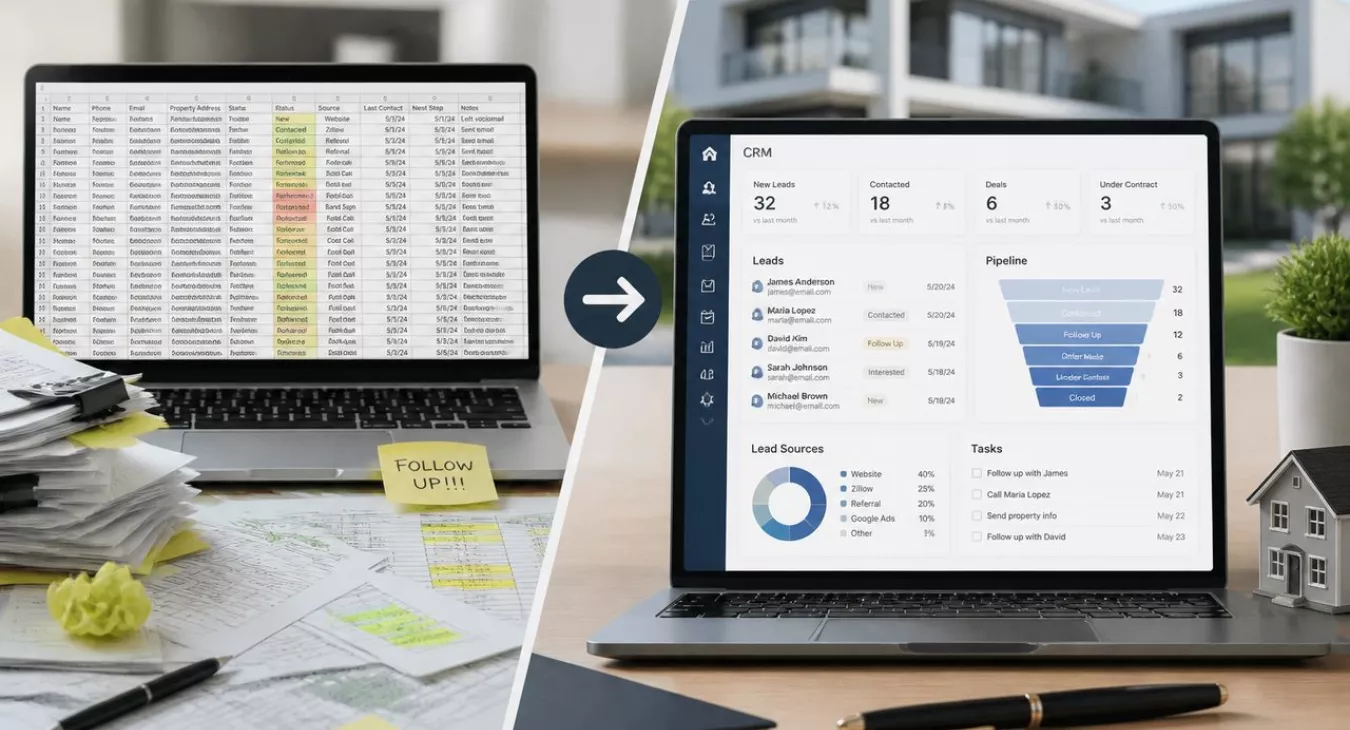
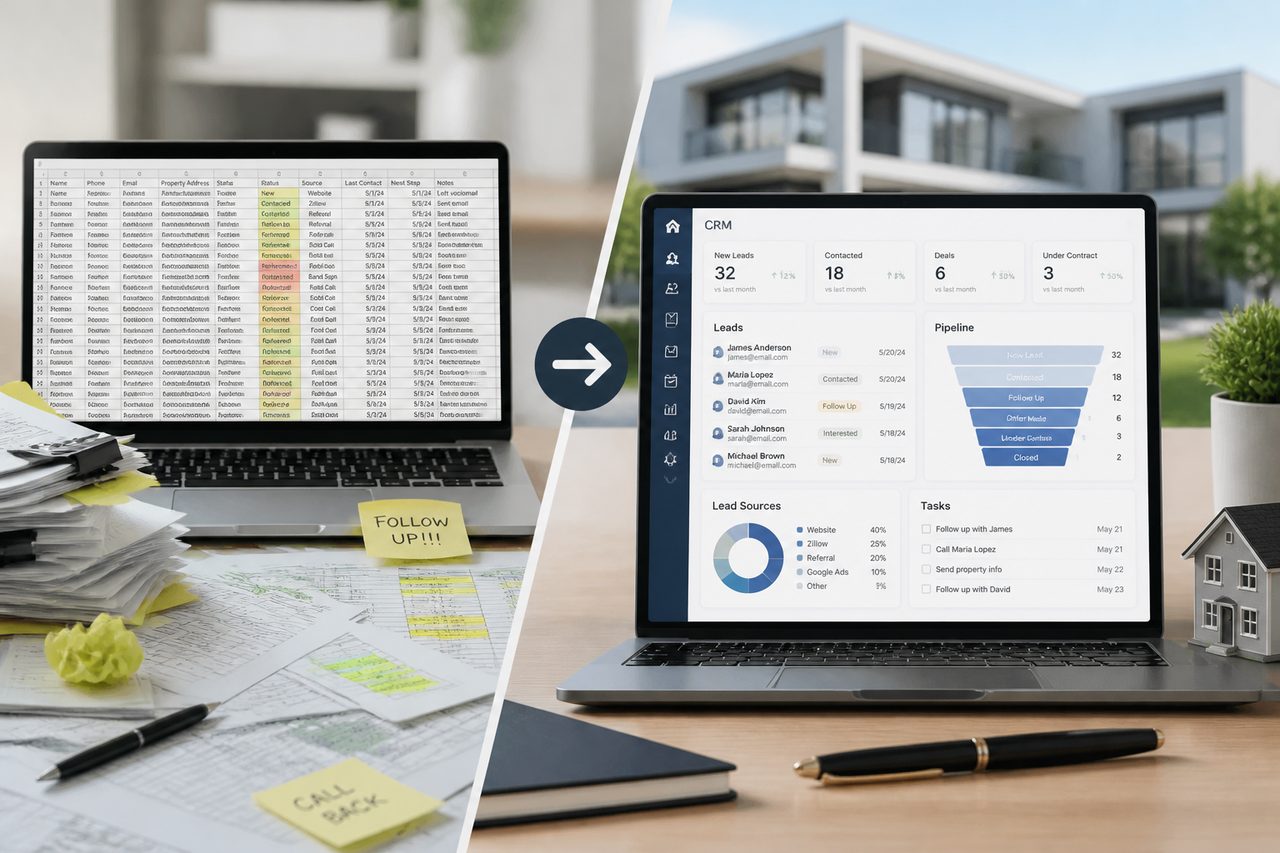
Real estate CRM vs spreadsheet: Learn why agents outgrow spreadsheets, when they still work, and how to switch without losing deals or data.
Products and Tools Mentioned in this Post


Follow Up Boss
Follow Up Boss is a real estate CRM that helps agents manage leads, automate follow-up, and increase conversions. Streamline your sales process today.
Wise Agent
Wise Agent is a comprehensive real estate CRM offering contact management, transaction tracking, email marketing, and automation tools for agents and brokers.

Contactually
Contactually is a real-estate-ready CRM with list building, skip tracing, calling, texting, automated follow-up, project management and websites under one login.
Table of Contents
- Table of Contents
- When Spreadsheets Still Work for Real Estate Teams
- Seven Critical Ways Spreadsheets Fail Real Estate Agencies
- Feature-by-Feature Comparison: CRM vs Spreadsheet
- The Hidden Costs of Free Spreadsheets
- Seven Warning Signs Your Spreadsheet Is Costing You Deals
- How Real Estate CRMs Work: Key Capabilities Explained
- Making the Switch: From Spreadsheet to CRM in One Week
- The Third Option: Hybrid Approaches and Lightweight Solutions
- Key Takeaways
- FAQ: Real Estate CRM vs Spreadsheet
You're managing real estate leads in a spreadsheet right now. That's not a sin — plenty of solo agents and small teams have closed deals with nothing but a well-organized Google Sheet and a sharp memory for follow-ups. And yet. At some point, the system that got you here starts bleeding deals, client relationships, and hours you'll never recover. The real question isn't whether CRMs beat spreadsheets in theory. It's whether your current volume, team size, and growth goals have already outgrown what you're using. This guide cuts through both sides, gives you a framework to self-assess, and shows you exactly what shifts when you make the move.
Back to topWhen Spreadsheets Still Work for Real Estate Teams
Here's the truth: spreadsheets work. They're free, you already know how to use them, and they bend to whatever structure you need. Zero setup time. Zero monthly fees. For a new agent still scraping together those first deals, paying for a full CRM platform doesn't make sense yet. The business has to be there to justify it.
The Spreadsheet Sweet Spot
There's actually a clear zone where spreadsheets are your best move. You've got fewer than 20 inbound leads hitting you each month. You're flying solo or working with one assistant. Your leads trickle in through one or two channels you can monitor without automation. In that scenario? A tight, well-organized spreadsheet lets you see your entire pipeline on one screen, know every client by name, and avoid the version-control nightmare that kills teams.
The data backs this up. According to the 2026 NAR Member Profile, the average Realtor closes 9 transaction sides annually. That's manageable spreadsheet territory. And here's the kicker—about 50% of a typical agent's business comes from repeat clients and past-client referrals. Referral-heavy pipelines are smaller, more predictable, and built for spreadsheet workflows.
Team Size and Capacity Thresholds
Add a second agent to that spreadsheet and things fall apart fast. Version conflicts. Data overwrites. Someone closes a deal but forgets to update the file. Accountability evaporates. Here's the hard rule: two or more agents sharing one lead database? You need a CRM. More than 20 qualified inbound leads per month? The system will pay for itself within months.
Still in spreadsheet territory and want a cleaner foundation before you outgrow it? Check out the free real estate investment spreadsheet templates available here. They'll help you structure your data the right way now, so the migration later won't be a disaster.
Back to topSeven Critical Ways Spreadsheets Fail Real Estate Agencies

Your spreadsheet works great until it doesn't. And the breaking point hits faster than you'd think. Once you're managing multiple agents, tracking 50+ monthly leads, and juggling properties across different stages—that same tool that got you here becomes your biggest operational bottleneck.
1. Manual Data Entry From Multiple Sources
Leads pour in from everywhere. Your website. Zillow. 99acres. MagicByricks. Housing.com. Facebook ads. Direct calls. Each one lands somewhere different. Someone has to open the spreadsheet, hunt for the right row, type the info without screwing it up. At 50+ leads monthly, you're basically paying someone $15-20/hour to play data secretary. That's not a system—that's a money drain.
2. Missing Follow-Up Alerts and Automation
Here's what kills deals: timing. 2026 data shows leads contacted within 5 minutes convert at 9× the rate of those you call after 30 minutes. Spreadsheets? They've got zero alert system. A lead arrives while you're showing property. It sits. Hours pass. According to a 2025 Inman survey, the average agent response time already hits 917 minutes—over 15 hours. A spreadsheet doesn't solve that. It makes it worse.
3. Fragmented Communication Tracking
Call notes live in one spot. Email thread in Gmail. WhatsApp on your phone. Property showing details in another tab. Client calls back in three weeks. You're now hunting through four different places trying to remember what they asked about. That's 10 minutes wasted. Every single time.
4. No Portal Integration
The portals don't talk to your spreadsheet. Not Zillow. Not Housing.com. Not any of them. Every lead from a portal means manual copy-paste. More room for typos. More delay. Native CRM integrations eliminate this friction entirely—that's not optional anymore.
5. Version Control and Collaboration Breakdowns
Even Google Sheets falls apart when multiple agents edit at the same time. Someone overwrites another person's notes. A row gets deleted by accident. An agent pulls up an old cached version and works from stale data. In a team of four? This isn't an edge case. It's happening every week.
6. Invisible Team Performance Metrics
Which agent actually closed 80% of your deals last month? What's your true conversion rate by lead source? How long do deals actually languish in your pipeline stages? Your spreadsheet can't answer any of that. Management becomes guesswork instead of strategy.
7. Data Error and Security Vulnerabilities
Local files. Personal cloud accounts. One wrong share setting. One accidental deletion. Client data exposed or records vanished forever—and no audit trail to trace back what happened. The liability here is real.
Back to topFeature-by-Feature Comparison: CRM vs Spreadsheet
Here's what actually separates a CRM from a spreadsheet. Each row below reflects something you're probably dealing with right now—situations agents bump into every single week.
| Feature | Spreadsheet | Real Estate CRM | Impact on Business |
|---|---|---|---|
| Lead capture automation | Manual entry only | Auto-capture from portals, web forms, ads | Eliminates data entry lag; reduces entry errors |
| Follow-up reminders | None (manual calendar entries) | Automated task creation, sequences, alerts | Faster response times; higher conversion rates |
| Communication history | Fragmented across apps | Unified timeline per contact | Context on every call; stronger client relationships |
| WhatsApp/SMS integration | Not available | Native or integrated in most modern CRMs | Faster response on preferred client channels |
| Portal integration | Manual copy-paste | Direct API feed from major portals | Zero lag from inquiry to CRM record |
| Multi-agent access | Conflict-prone; no permissions | Role-based access; real-time collaboration | Eliminates overwrite errors; enables accountability |
| Reporting and dashboards | Manual pivot tables; time-intensive | Real-time pipeline and conversion reports | Data-driven decisions instead of guesswork |
| Lead source tracking | Only if manually maintained | Automatic tagging at point of capture | Identifies which channels drive ROI |
| Mobile access | Usable but clunky on mobile | Dedicated mobile apps with full functionality | Agents update records from the field in real time |
| Scalability | Degrades past ~20 leads/month per agent | Designed to scale from 1 to 100+ agents | No rebuild required as business grows |
Want to know if you're still stuck in spreadsheet mode? Walk through that table. How many items in the "Spreadsheet" column describe your actual workflow right now? If it's five or more—you're hemorrhaging money. The best diagnostic tool is your own gut: are your agents wasting time on data entry and hunting for context instead of closing deals?
And here's the thing. Technology adoption isn't optional anymore. The 2026 real estate market trends guide breaks down exactly how CRM adoption is reshaping competitive advantage across the industry. Read it if you want concrete data on where this is heading.
Back to topThe Hidden Costs of Free Spreadsheets
Open a spreadsheet and you'll pay nothing. That's the trap. The real bill? It's measured in labor hours, deals that vanish, and inefficiency that compounds month after month.
Time Cost of Manual Data Entry
Fifty leads a month. Add manual data entry, deduplication, status updates — that's 6–8 hours per agent, per month. Gone. Not on showings. Not on client calls. Not on listing presentations that close deals. Three agents on your team? You're bleeding 18–24 hours of productive capacity every single month to paperwork.
Lost Revenue From Missed Follow-Ups
Here's where it gets expensive. The average internet lead conversion rate sits between 0.4% and 1.2% (top performers hit 3%–5% as of 2026). Every lead buried in your spreadsheet that never gets an alert, never triggers a follow-up task, never gets automated outreach? That's a deal with real probability of closing. And we're not talking small money. The U.S. median existing-home sale price hit $429,100 in August 2026. Factor in the combined commission rate of 5.70% as of February 2026, and you're looking at roughly $12,000 in gross commission on that one missed median-priced home. Miss one or two deals a year and you've already paid for a CRM subscription ten times over.
The Break-Even Reality
Real estate CRMs run $19 to $99 per month for solo agents in 2026. Most settle in at $49–$69. Even maxing out at $99/month, you're at $1,188 annually. One additional deal that doesn't slip through the cracks? That covers it a hundred times over. The math is dead simple. Ask yourself: how many deals are you okay losing to save $100 a month?
Opportunity Cost of Agent Time
And there's something bigger here. Your agents are stuck maintaining spreadsheets instead of building relationships. That data entry, deduplication, status reporting — it's all time stolen from nurturing the referral connections that the NAR says account for 40% of how buyers find their agent as of 2026. The real hidden cost isn't just deals lost today. It's the pipeline you never build tomorrow.
Back to topSeven Warning Signs Your Spreadsheet Is Costing You Deals

Run through this checklist honestly. If you're hitting more than three of these, you're already bleeding deals — and the upgrade conversation needs to happen now.
- Follow-ups routinely missed. A lead sits in your inbox. Three days pass. You finally remember someone called last week, but by then they've already moved on to another agent. No alert. No reminder. Just that sinking feeling you get when you realize what you've lost.
- Multiple versions in circulation. Your assistant's working from "Leads_Final_v3.xlsx." You're looking at "Leads_Updated_Oct.xlsx." Neither of you knows which one's actually current, and the real data? It's scattered across both files.
- Agent activity is invisible to management. Did your agent actually call that lead, or did they just mark it "contacted" and move on? You've got no way to know without asking — which means you're not seeing the underperformance until the numbers fall short.
- Conversations scattered across platforms. Client history lives in WhatsApp, email, SMS, and someone's spiral notebook. Want to hand off that prospect to another agent? You're looking at a 30-minute briefing call just to catch them up on context.
- Manual reporting takes hours. Every Monday, someone blocks out 90 minutes to build the pipeline report. And here's the kicker — by the time they're done, the data's already stale. You're making decisions on yesterday's information.
- Lead sources aren't tracked consistently. Leads are coming in. But which channel's actually closing deals? Is it Zillow? Facebook ads? Your organic website traffic? You don't have reliable data on any of it, so you're essentially guessing where to spend your marketing budget.
- Team coordination is becoming a mess. Two agents nearly called the same prospect on the same day. Now the whole team's coordinating through WhatsApp instead of your actual system. That's not collaboration — that's chaos.
Here's what matters: each of these signs has a direct revenue impact. Missed follow-ups cost closed deals. Invisible agent activity breeds underperformance. And when conversations are scattered everywhere? Clients feel forgotten — and forgotten clients go somewhere else.
Back to topHow Real Estate CRMs Work: Key Capabilities Explained

A real estate CRM isn't just a prettier spreadsheet. It's the nervous system connecting your lead sources, your agents, and your clients into one functioning machine. Everything that follows—automation, accountability, forecasting—flows from this foundation.
Centralized Lead Database With Unified Contact View
Think of it this way: every lead lands in one database with complete context attached. Source. Inquiry date. Property interests. Communication log. Tasks. Deal stage. An agent can jump into a conversation cold and have full visibility in under 60 seconds. That's not a small thing when you're managing 50+ active leads.

Automatic Lead Capture From Multiple Sources
Your portal integrations (Zillow, 99acres, MagicBricks, Housing.com), website forms, Facebook Lead Ads, Google ads—they all feed straight into the CRM. No data entry. No delays. And here's the critical part: no leads slip through the cracks because someone stepped away from their desk.
Built-In Follow-Up Automation and Task Management
A new lead hits the system. The CRM creates a follow-up task automatically, usually within minutes. Drip sequences fire off timed emails or SMS without your agent lifting a finger. Reminders pop before deadlines, not after they've passed. This single feature—the automation layer—is what separates a CRM from an overengineered spreadsheet, and it's directly tied to your conversion rates.
Real-Time Team Collaboration and Activity Tracking
Managers see the full pipeline in real time. Every agent's activity log. Response times. Lead assignment happens in the system, not via email. Duplicate outreach gets prevented automatically. Accountability isn't something you enforce in Monday meetings—it's baked into the platform.
Advanced Reporting and Pipeline Forecasting
Want to know which lead source is actually profitable? Check the dashboard. Real-time visibility into lead source performance, pipeline value, conversion rates by stage, agent activity—no spreadsheet compilation needed. This is game-changing for teams making marketing budget calls. It also ties directly to the investor-level strategy covered in the 2026 real estate market trends analysis.
Mobile Access and WhatsApp Integration
Modern CRMs give you full functionality on mobile. Agents update records, log calls, send follow-ups from the field—not back at the office. And WhatsApp integration matters more than people think. Client conversations stay inside the CRM, not scattered across personal chat apps that vanish the moment an agent quits.
Back to topMaking the Switch: From Spreadsheet to CRM in One Week

Most teams never pull the trigger on CRM migration because they're scared. Here's the reality: it's faster and way less risky than you think it'll be.
Day 1–2: Pre-Migration Assessment and Data Audit
Start by exporting your spreadsheet to CSV. Then audit it hard—remove duplicates, standardize every field name the same way (First Name, Last Name, Phone, Email, Lead Source, Stage), and mark any leads missing critical contact info. Why? A clean import upfront saves you from data cleanup hell later.
Day 3: Choose the Right CRM and Map Your Fields
Before you touch anything, match your spreadsheet columns to the CRM's fields. Most platforms walk you through field mapping during the CSV import step. It's straightforward if you've prepped. Now pick your tool. Solo agents and small teams? The $49–$69/month options like Wise Agent or Follow Up Boss get the job done. But if your team needs texting, calling, email, pipelines, workflows, funnels, and social posting all in one place, Contactually deserves a hard look—it's the real-estate-specific CRM that KDS (this site's publisher) partnered on. This isn't the old Contactually that Compass bought; it's purpose-built for operators like you. Calls, minutes, and texts get billed separately on top of your plan—check contactually.net for current rates. And if you're running investor-heavy workflows like list stacking or need serious skip-tracing muscle, investor-focused platforms like REsimpli or REISift might have what you need—just compare them against your actual workflow, not buzzwords.
Day 4: Import and Verify
Test it first. Import 10–20 records and check everything: fields populated right, contact relationships intact, nothing missing. Once that's clean, push the full dataset through.
Day 5–6: Team Training and Parallel Systems
Run both systems at the same time for a few days. That's not a crutch—it's smart risk management. Focus training on the three things your team will actually do constantly: logging a lead, moving a deal stage, and setting a follow-up task. Don't overwhelm them with everything on day one.
Day 7: Quick Wins and Sunset the Spreadsheet
Automate your first follow-up sequence.
Pull your first pipeline report. Show your team what visibility they've got now that they didn't have before. Once they feel that shift, they'll stay on the CRM without you pushing. Archive the spreadsheet—don't torch it—and move on.
Building out your broader online presence alongside this move? The real estate investor website guide walks through the pages and lead capture setup that feed directly into your CRM engine.
Back to topThe Third Option: Hybrid Approaches and Lightweight Solutions
Not every team needs to jump straight to a full CRM. There's a middle path worth acknowledging.
Google Sheets as a Bridge Solution
Google Sheets paired with Zapier can automate lead capture from web forms and fire off basic notifications. For teams sitting right on the edge of spreadsheet viability, this works as a legitimate bridge — more powerful than raw sheets, but not quite a real CRM. But the cracks show fast: no native portal, no communication timeline, no pipeline forecasting. And those Zapier fees? They stack up as your workflow gets more complex.
Lightweight vs. Enterprise CRM Options
There's a real spectrum here. A solo agent or 2–3 person team might get by fine on a lightweight CRM running $19–$49/month. But if you're handling 100+ leads monthly across multiple team members, you're probably looking at something more serious. The jump to a bundled lead-gen and brokerage platform — which can hit $500–$1,099+/month in 2026 — actually makes financial sense when you factor in the operational efficiency gains.
When Hybrid Makes Sense Temporarily
Say you're mid-push on a big listing or juggling a complicated closing. This is not the week to overhaul your CRM. Run hybrid instead. Feed new leads into the CRM while your active deals stay in the spreadsheet. Then do a clean cutover once you've got breathing room. Adoption that sticks beats a rushed migration that gets abandoned every time.
Running parallel systems isn't just about the CRM, though. Agents serious about their business need to get the legal and tax side right too — that's where knowing when to hire a real estate tax attorney and understanding real estate investor insurance come in. And if you're buying leads to fill that pipeline? Check out the guide to the best places to buy real estate leads before you commit budget.
Back to topKey Takeaways
The spreadsheet vs CRM question? There's no one-size-fits-all answer. But the decision points are crystal clear.
- Spreadsheets work if you're flying solo, pulling fewer than 20 leads monthly from a single source, and handling your own follow-ups without needing a team.
- They break down fast once you add team members, volume jumps above 20 leads/month, leads scatter across multiple sources, or automated follow-up becomes the difference between closing deals and losing them.
- The math is brutal. With a median home price of $429,100 as of August 2026 and roughly a 5.70% combined commission as of February 2026, one extra deal you close because your follow-up system doesn't suck? That pays for your CRM subscription for years.
- Migration's quicker than you'd expect: Export your data clean. Map it properly on import. Train your team on three core workflows. You're live in a week.
- You don't need enterprise bloat. Standalone CRMs starting at $19–$49/month, or platforms like Contactually, can overhaul your operation without breaking the bank—even for solo agents grinding it out.
The best moment to switch? That time you dropped a follow-up and watched the deal walk. The second-best moment is right now, before it happens again. Want to know how CRM stacks up against other tools you're already using? The CRM vs email marketing platform comparison shows you exactly when each tool pulls its weight.
Back to topFAQ: Real Estate CRM vs Spreadsheet

Can I use Google Sheets as a CRM?
Sure, you can. Real-time collaboration works great, and you can bolt on Zapier or Apps Script to handle some automated lead capture and alerts. But here's what you're missing: no native communication timeline, no built-in follow-up automation, no portal integrations, and your pipeline reporting will be a pain. It's fine as a temporary band-aid if you're running thin. Once you hit 20+ leads per month or have multiple agents, though? You need an actual CRM. There's no way around it.
How long does CRM implementation take?
One week for most small teams with halfway decent data. That breaks down to two days just auditing and cleaning, one day setting up the CRM and mapping fields, one day importing and double-checking everything, and two more days training your team and running both systems at once. The real wildcard? Data quality. A messy spreadsheet turns into a messy CRM. Clean it first.
What data should I track for each lead?
Start with the essentials: full name, phone, email, lead source, inquiry date, property type, budget range, pipeline stage, and next follow-up date. And honestly? Most modern CRMs capture communication history automatically once you plug in your email and phone system. From there, layer in notes about timeline, financing situation, and what properties actually interest them. The goal is dead simple — any agent on your team picks up that relationship and already knows what's happening. No scrambling. No starting over.
How much does a real estate CRM cost?
You're looking at $19–$99 per month for standalone systems in 2026, with most landing somewhere between $49 and $69. Want lead generation and brokerage tools built in? Expect $500–$1,099+ monthly. All-in-one plays like Contactually get granular with usage-based pricing. Check contactually.net for what they're running right now. Pick your entry point based on team size, monthly lead volume, and which integrations you actually can't live without.
Will I lose my data during the switch?
Not if you do this right. Export your spreadsheet to CSV, clean it up before importing, test with a small batch first, verify your field mappings are locked in. Then go live with the full import. Keep your old spreadsheet archived for 30 days minimum — it's your safety net. Most CRMs worth using let you export whenever you want anyway, so you're never trapped without an exit.
Back to top